Getting started
Wi-Fi
The most convenient way: no wires, 2–10 ms of latency.
How to connect
The phone and the PC must be on the same network. The PC can be wired to the router, that's even better.
- Start Rulik Server on the PC.
- In the app, open the PC tab: the computer shows up under "PCs on the network".
- Tap it and enter the PIN from the server window.
Discovery uses a broadcast packet on the local network, so there's nothing to type.
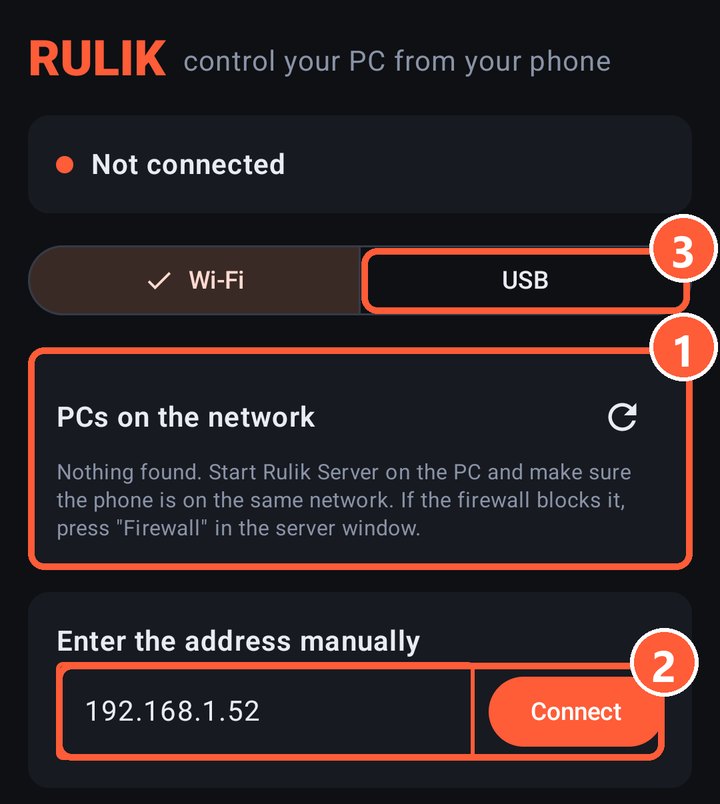
- 1Every PC running Rulik Server shows up here
- 2Entering the address manually
- 3Switching to a cable connection
Entering the address manually
If the PC isn't found, tap "Enter the address manually" and type the address from the server window, for example 192.168.1.52. The server window may list several addresses: use the one that belongs to your home network.
Still not found? Press "Firewall" in the server window: it adds a rule for port 47800. Other causes are in PC not found.
Making it faster
- Connect the phone to 5 GHz Wi-Fi and wire the PC to the router.
- Don't sit far from the router or behind thick walls.
More in If it lags.