Getting started
USB tethering
The easiest way over a cable. No debugging needed, and no Wi-Fi adapter on the PC either.
How to connect
- Connect the phone to the PC with a cable.
- In Android settings, turn on "USB tethering" (usually under Hotspot & tethering).
- In the app, stay on the Wi-Fi tab: the PC shows up in the list, and the traffic goes over the cable.
Firewall
Windows marks the phone's network as public and blocks incoming connections from it by default. The server detects this and shows a warning.
Press "Firewall" in the server window once: the rule works for all networks.
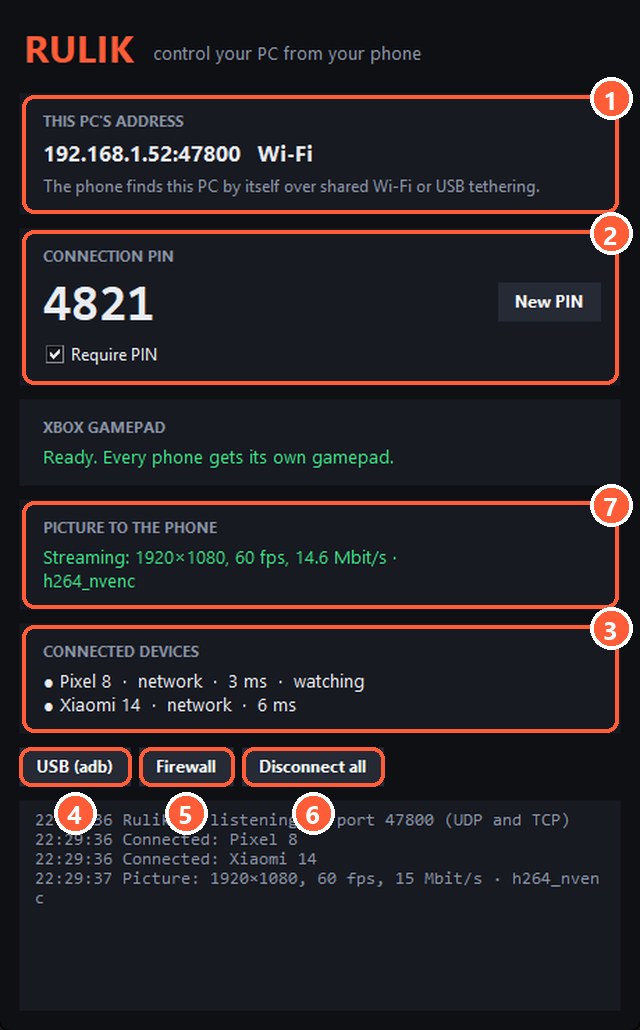
- 5"Firewall" adds a rule for port 47800 on all networks
No new network appeared
If no new network shows up in Windows after you turn on tethering, open Device Manager. The phone should appear as "Remote NDIS based Internet Sharing Device".
- Try another cable: some cables only charge and don't carry data.
- Try another USB port, ideally one right on the motherboard.
Still no luck? Connect via adb.