Play on the phone
Picture quality
Stream settings are in the app on the Settings tab, in the "Picture from the PC" block. Changes apply the next time you start playing.
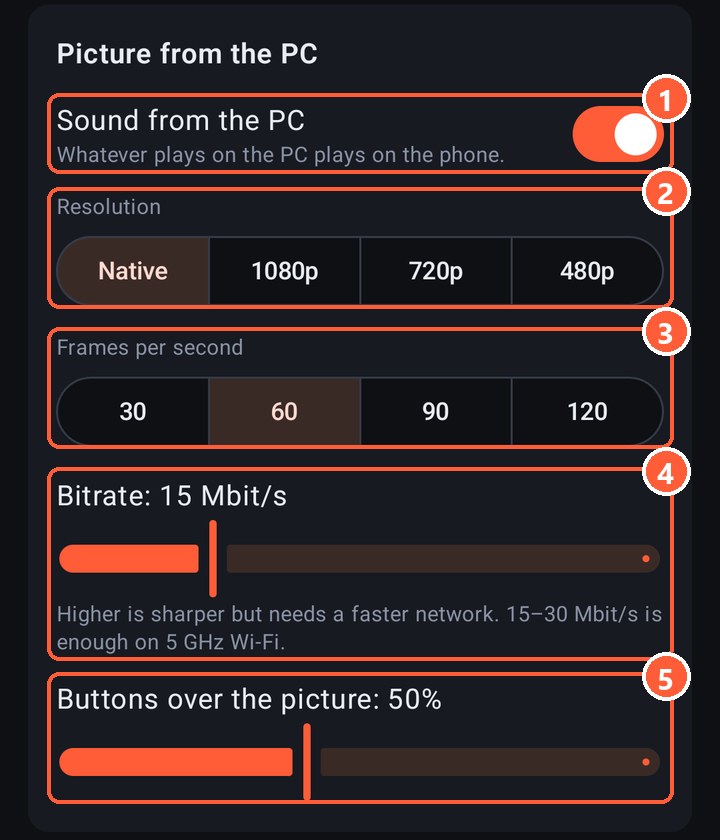
- 1Sound from the PC on the phone
- 2Picture resolution
- 3Frames per second
- 4Bitrate: how much data goes over the network per second
- 5How visible the layout buttons are over the game
What to pick
| Network | Resolution | Frames | Bitrate |
|---|---|---|---|
| Cable (USB tethering) | Native | 60 | 30–50 Mbit/s |
| 5 GHz Wi-Fi near the router | Native or 1080p | 60 | 15–30 Mbit/s |
| 2.4 GHz Wi-Fi or through a wall | 720p | 60 | 6–10 Mbit/s |
| A really bad network | 480p | 30 | 3–5 Mbit/s |
"Native" means the same as the PC's monitor. A phone screen is small, so 1080p and 1440p look almost the same on it, and 1080p is much easier on the network.
You can't get more frames than the PC's monitor shows: with a 60 Hz monitor the server caps the stream at 60. 90 and 120 make sense with a 120 Hz or faster monitor. While you play, Rulik switches the phone's screen to its highest refresh rate so frames don't wait.
Latency
The total is the network delay (ping), compression on the graphics card (a few milliseconds) and decoding on the phone. If the ping is turned on in the settings, the corner shows how many milliseconds a frame took from arrival to the screen. All together it's usually 20–40 ms over 5 GHz Wi-Fi and less over a cable.
The same things help as with lag: 5 GHz, the PC wired to the router, battery saver off.
Blocks and freezes
Over Wi-Fi some packets always get lost. With an NVIDIA graphics card (or no graphics card) the picture doesn't freeze because of it: garbage flashes where the loss was for a split second and heals right away. With AMD and Intel the phone waits for the next whole frame, up to a second.
If many frames get lost over Wi-Fi for several seconds in a row, Rulik lowers the bitrate by itself and says so at the top of the screen. The bitrate in the settings stays the same: next time it starts from it.
Sound
The phone plays everything the PC plays: the game, music, notifications. The sound is uncompressed, about 1.5 Mbit/s. If you don't need it, turn off "Sound from the PC" to make the network lighter.